
It’s been a busy summer. Here’s what came out of it.
Badger started as a handful of detections on a handful of sheets. What shipped this summer is the rest of the workflow: a complete take-off you can drive from the first sheet to the last.
Fire alarm is the newest trade we count
Smoke detectors, heat detectors, smoke/CO detectors, horn/strobes, strobes, speakers and pull stations now come off fire alarm plans, broken out by device type on the dashboard, in the BOM, and through the API.
It joins what already gets counted automatically: light fixtures and switches, receptacles, panels, disconnects, motors, junction boxes, telecom outlets, doors and windows, plus the panel schedules and gear read off the schedules and one-lines.

Take-off mode on every sheet
Any sheet flips into take-off mode, and the assist keeps working inside it.
Box one, get the rest. Draw a box around a single symbol and Badger finds every other instance of it on the sheet. You accept the ones you want. It works on any mark you can point at, including symbols we have no model for.
Box a schedule, get a table. Frame a table on a drawing and it comes back as structured rows.
Manual tools. Click items into place, draw conduit and linear runs, and shape the materials legend into groups you name, reorder, and drag between.
Everything you add lands in the same count as everything detected: one take-off and one BOM.
Box one unit heater, and Badger finds the other six on the sheet.
The whole electrical system in one view
Badger stitches a floor’s sheets back into one continuous plan and draws every detection onto it. Lighting, power, fire alarm and mechanical become layers you turn on and off, floor by floor and building by building. Sheets drawn at different scales, such as fire alarm at 1/8” against everything else at 1/4”, are normalized onto the same building.

Constructability
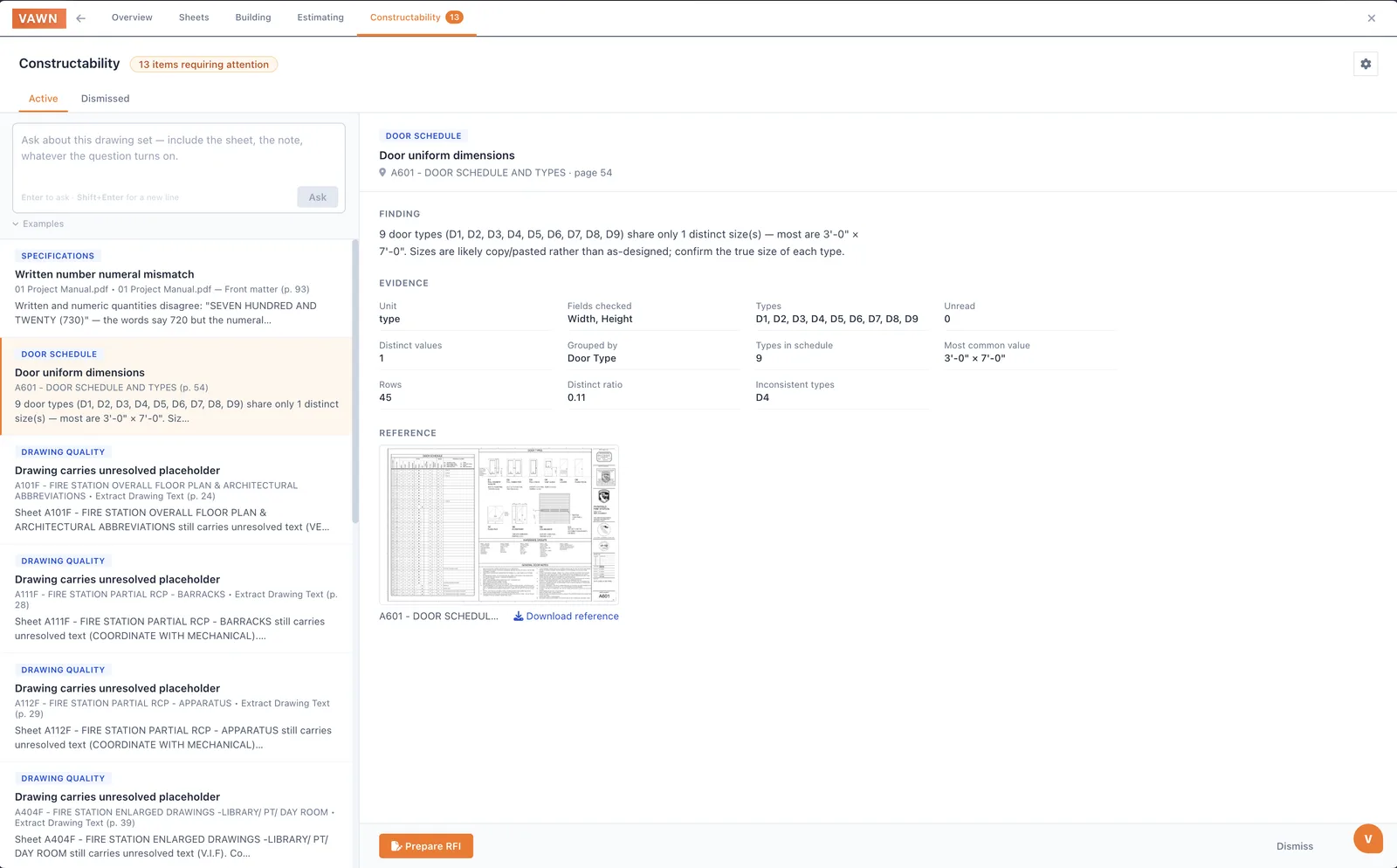
A review tab that reads the set against itself and flags contradictions: a schedule that disagrees with the plan, a spec that disagrees with the schedule.
The case that started it was a door schedule listing every door on a sheet at 3’-0”×7’-0”, when the roll-ups on that sheet are 12’×12’. It went out as an RFI instead of being caught during the bid.
Findings arrive as a working inbox. You can ask the set a question and keep the answer attached to the finding.
Multifamily sets read as buildings
Badger works out what kind of building the set describes (apartments, hotel, or a straight commercial floor plan) and finds the unit types that repeat through it. A project holding four buildings is read as four buildings, each with its own storeys.
You take off a unit once and increment the unit count, instead of counting the same apartment forty times.

Run it without opening Badger
There’s a public API with keys you generate yourself. Push a set in, poll it, and pull the results (extractions, drawings, equipment) into whatever you already use. It takes uploads the way the browser does, so a 200 to 800 MB plan set goes through.
Two lighter ways in. Forward a set to your Badger address and the take-off starts on its own, no login. And an MCP server lets an AI assistant query your extractions against the same key.
If you want to see it end to end, there’s a guide on running a takeoff with Claude and the API.
Also shipped
Most of the summer went into the detections you already rely on.
- Correct a wrong drawing scale. We read scale off the title block and are regularly wrong. On one 1,156-sheet set, 472 sheets carried a scale nobody had read. You can now set or calibrate it on any sheet, and every measured run that came off it restates.
- Panel schedules on dense, multi-panel sheets read more completely, and panels sharing a name stay separate.
- Lighting counts are more accurate, schedules that used to come back blank are recovered, and fixture marks are matched off the drawings when a set has no usable schedule.
- Detections land on the symbol they came from, instead of at the wrong spot on the sheet.
- Grounding is treated as its own system, drawn floor by floor.
- Large sets finish. Detection on multi-sheet requests runs several times faster, and sets that used to time out now come back.
- Every schedule in one place, on a project-wide page.
Want in? Join the waitlist. We’re onboarding the next cohort in early September.
The full changelog is here if you want the release-by-release detail, or see what Badger does for Division 26 electrical.