You do an electrical takeoff with Claude and BADGER by giving Claude your BADGER API key and a blueprint PDF, and asking it, in plain English, to run the takeoff. Claude writes the code that sends your PDF to BADGER’s API, waits for the counts, pulls the results, and shapes them into a bid-ready takeoff. The counts come from BADGER’s detection engine, not from a language model guessing at quantities, and you review the result before it ever reaches a bid. You don’t write any code. Claude does.
Key takeaways
- BADGER turns a plan-set PDF into structured counts (lighting, power, panels, gear, schedules, and more) in minutes.
- You never write code. You ask in plain English; Claude writes the API calls, and in Claude Code or Claude Cowork it runs them and hands back the counts.
- The counts are deterministic and tied to the exact sheet they came from: auditable, not invented.
- Claude then reconciles the counts against the schedules, flags what needs a second look, and builds your takeoff table or CSV.
- It is a reviewed first-pass draft. You still own measurement, labor units, scope, and margin.
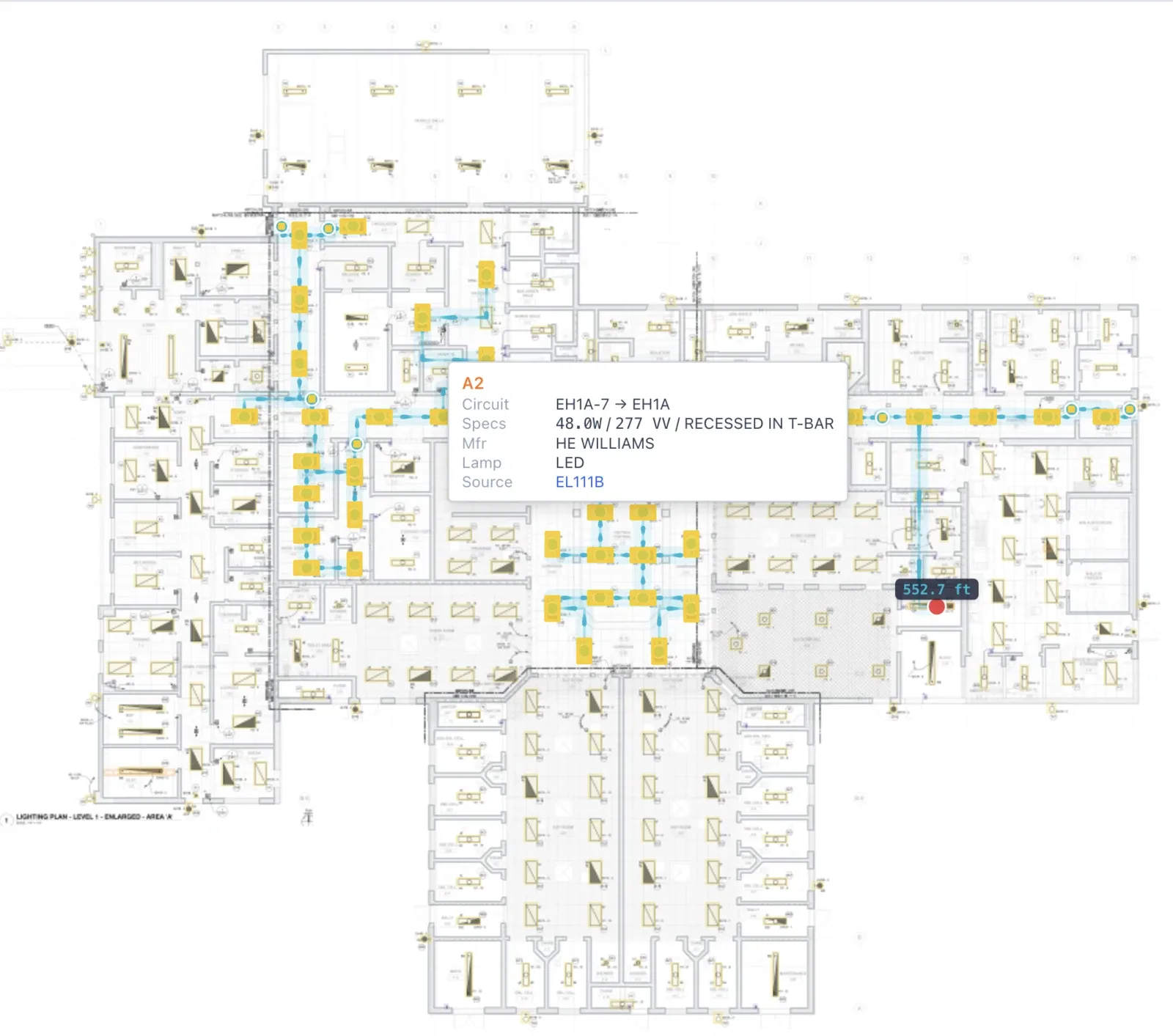 A live BADGER takeoff on one of a jail’s lighting sheets: every fixture detected, typed, and tied to a circuit. These are the counts you’d otherwise tally by hand.
What is an electrical takeoff, and where does AI actually fit?
A takeoff (quantity takeoff) is the quantification of a job: reviewing the drawing set and counting and measuring every item shown, from fixtures and devices to conduit, wire, panels, and gear. It produces quantities, not dollars. The estimate prices those quantities with material and labor; the bid is the estimate plus overhead, profit, and scope, packaged as the number you submit. Each stage depends on the one before it, which is why a single missed count early on can quietly turn a profitable job into a loss. (See Procore’s electrical estimating guide and McCormick on takeoff vs. estimate vs. bid.)
Within the takeoff, some things are counted (fixtures, switches, receptacles, junction boxes, panels, disconnects, gear) and some are measured by length (conduit, wire, cable tray, feeders). The counting is high-volume and mind-numbing; the measuring and the judgment behind it are where experience pays off.
That split is exactly where AI fits. BADGER automates the count and reads the schedules. It detects and tallies symbols across every sheet, and it extracts the panel, feeder, and lighting schedules as structured data, including manufacturer and model where they appear. What stays with you is the judgment: routing-aware lengths, assemblies, labor units, scope hidden in the specs and notes, and the price. By common industry accounts, takeoffs can eat close to half of the bid cycle, and a mid-size commercial electrical takeoff can run 40–60 hours of an estimator’s time. Cutting that down is the whole point.
Why use Claude + BADGER instead of manual counts or generic ChatGPT?
The biggest, most reasonable objection in this category is that AI “silently invents quantities.” As one MEP-estimating writeup puts it, “a good AI system should not silently invent a quantity. Instead, it should surface that note as a review item.” That is precisely the design here: the numbers are produced by BADGER’s detection engine and tied to the sheet they came from. Claude writes the code to fetch them and reasons on top of trustworthy counts. It never makes up the quantities itself.
| Capability | Manual takeoff | Generic ChatGPT alone | Claude + BADGER |
|---|---|---|---|
| Where counts come from | You, symbol by symbol | The model’s best guess; it can miss or invent items | BADGER’s detection engine; Claude never invents a quantity |
| Speed on a full set | Hours to days | Fast but unreliable | Minutes to a first draft |
| Repeatable | Varies with fatigue | Different answer each run | Same input gives the same counts |
| Whole plan set | If you have the hours | Struggles past a few pages | Every sheet, every discipline |
| Schedules as data | Manual transcription | Inconsistent | Panel/fixture/feeder schedules parsed, with manufacturer and model |
| Auditable to the sheet | Your highlighter marks | No provenance | Every item tied to its drawing and page |
| Best for | Small, simple jobs | Emails, brainstorming | Counting + reconciling real plan sets |
In short: ChatGPT alone is a confident guesser. BADGER is the deterministic counter. Claude is the analyst that writes the glue code, ties it together, and hands you something you can check.
What you’ll need before you start
- A BADGER account and API key. You generate a
badger_live_key yourself in your account settings at app.groundworksystemshq.com. New accounts include free extraction credits to start. - A blueprint PDF: your electrical plan set (the architectural backgrounds also help with room and area context).
- A version of Claude that can run code (Claude Code or Claude Cowork), so Claude can call the API for you and return the counts. Any Claude (including the web app) can write the script; Code and Cowork also run it.
- A clear sense of scope: which disciplines you’re counting (lighting, power, panel schedules, HVAC, architectural, telecom).
Step-by-step: your first AI electrical takeoff
The whole workflow is a conversation. You ask; Claude writes and runs the API calls; you review.
Step 1: Get your BADGER API key
Sign in at app.groundworksystemshq.com, open your account settings, and create an API key. It looks like badger_live_.... This is what Claude will use to talk to BADGER. Treat it like a password (it can trigger runs and read your results), and rotate or revoke it anytime.
Step 2: Give Claude your key and point it at the BADGER API
Open Claude Code or Claude Cowork. The safest way to share the key is as an environment variable so it never sits in your chat history:
export BADGER_API_KEY="badger_live_YOUR_API_KEY"Then tell Claude what it’s working with: the base URL https://app.groundworksystemshq.com, the key in BADGER_API_KEY, and the reference at docs.groundworksystemshq.com. Claude now has everything it needs to write the calls. (Prefer not to touch a terminal? Paste the key into the chat and use the claude.ai web app; Claude will write a script you can run once.)
Step 3: Ask Claude to run the takeoff
Now just describe the job in plain English. Claude writes the code to upload your PDF, start the extraction with the disciplines you want, poll until it finishes, and pull the results:
Using my BADGER API key (in $BADGER_API_KEY), run a takeoff on ./E-101.pdf for
lighting, power, and panel schedules. Start the extraction, poll until it's
completed, then pull the equipment and drawings. Give me total counts by
category and a per-sheet breakdown.
Under the hood Claude POSTs your PDF to /v1/extractions with the discipline slugs, watches the status move from queued to processing to completed, and reads back the equipment and drawings (the exact API is in the appendix). A multi-sheet set typically takes a few minutes.
No terminal? Start the run another way. You can also kick off a takeoff by uploading the PDF in the BADGER app or forwarding it to your BADGER inbound email address. Then just ask Claude to pull and analyze the results of your latest extraction; Steps 4–6 are the same from there.
Step 4: Have Claude reconcile the counts against the schedules
This is the highest-value QA step in any takeoff, and the one estimators do by hand. BADGER already extracted the schedules as data, so Claude can cross-check them against the detected counts:
Cross-check the detected device and fixture counts against the extracted panel
and fixture schedules. List, as a table: (1) counts that match, (2) counts that
disagree with a schedule, (3) schedule items with no detected device, and
(4) detected items with no schedule entry. Flag anything that looks like a
double-count, and cite the sheet for each issue.
You get back a punch list of exactly where to look, not a vague “looks good.”
Step 5: Build a bid-ready takeoff
Now turn the reconciled data into something you can price:
Build a takeoff summary as a CSV, grouped by discipline and then by sheet.
Columns: category, type, manufacturer, model, quantity, sheet. Add a 10% waste
allowance line for wire and a "REVIEW" flag on any item you weren't confident
about. Don't invent quantities; if something is missing, leave it blank and
note it.
Claude assembles the table, keeps the manufacturer and model that BADGER pulled from the schedules, and leaves the routing, assemblies, and labor units to you.
Step 6: Spot-check against the drawings
Treat the output as a first-pass draft, not a final count. Open the plan set and verify the high-stakes pages: confirm you’re on the current revision, sanity-check the scale in the title block, and trace a few home runs and feeders by hand. The point of the AI pass is that this review is now targeted (every count is anchored to a specific sheet) instead of re-counting everything from zero.
A real run: a jail’s lighting plans, end to end
This isn’t hypothetical. We sent a real plan set, the lighting drawings for a county jail, straight through the public API, exactly as described above. The instruction to Claude was one sentence: “run a takeoff on these lighting plans for lighting, power, and panel schedules, then give me the counts by category and sheet.”
About 14 minutes later, BADGER returned 288 lighting fixtures, 31 switches, 20 branch breakers, and 4 panels: 343 items across 5 sheets, each anchored to the drawing it came from (those are the detected fixtures and circuiting shown on the lighting sheet at the top of this page). Here’s a real fixture row from the /equipment response:
{
  "id": "ff6a0978-697e-47b2-ab61-9a694e7c1c9e",
  "category": "lighting",
  "name": "A2",
  "drawing_id": "29032912-d9c1-2397-9ba0-5ad13c2fb771",
  "properties": {
    "type": "A2",
    "circuit": "H2-8",
    "full_name": "A2 - HE WILLIAMS 2'x4' RECESSED ARCHITECTURAL LED TROFFER; 0-10V DIMMING DRIVER"
  }
}
Each fixture comes back typed (A2), assigned to a circuit (H2-8), and carrying its full schedule description, here a HE Williams recessed LED troffer. Branch breakers even include an estimated home-run length ("conduit_length": 330.9) you can check against your own routing.
Opened in the BADGER app, the same building shows the full picture. Across the complete jail plan set (307 sheets), BADGER found 1,261 electrical items, including 446 pieces of distribution gear (17 panels, 8 switchgear, 4 transformers, 415 breakers) and the same 288 lighting fixtures, sorted into 55 types:
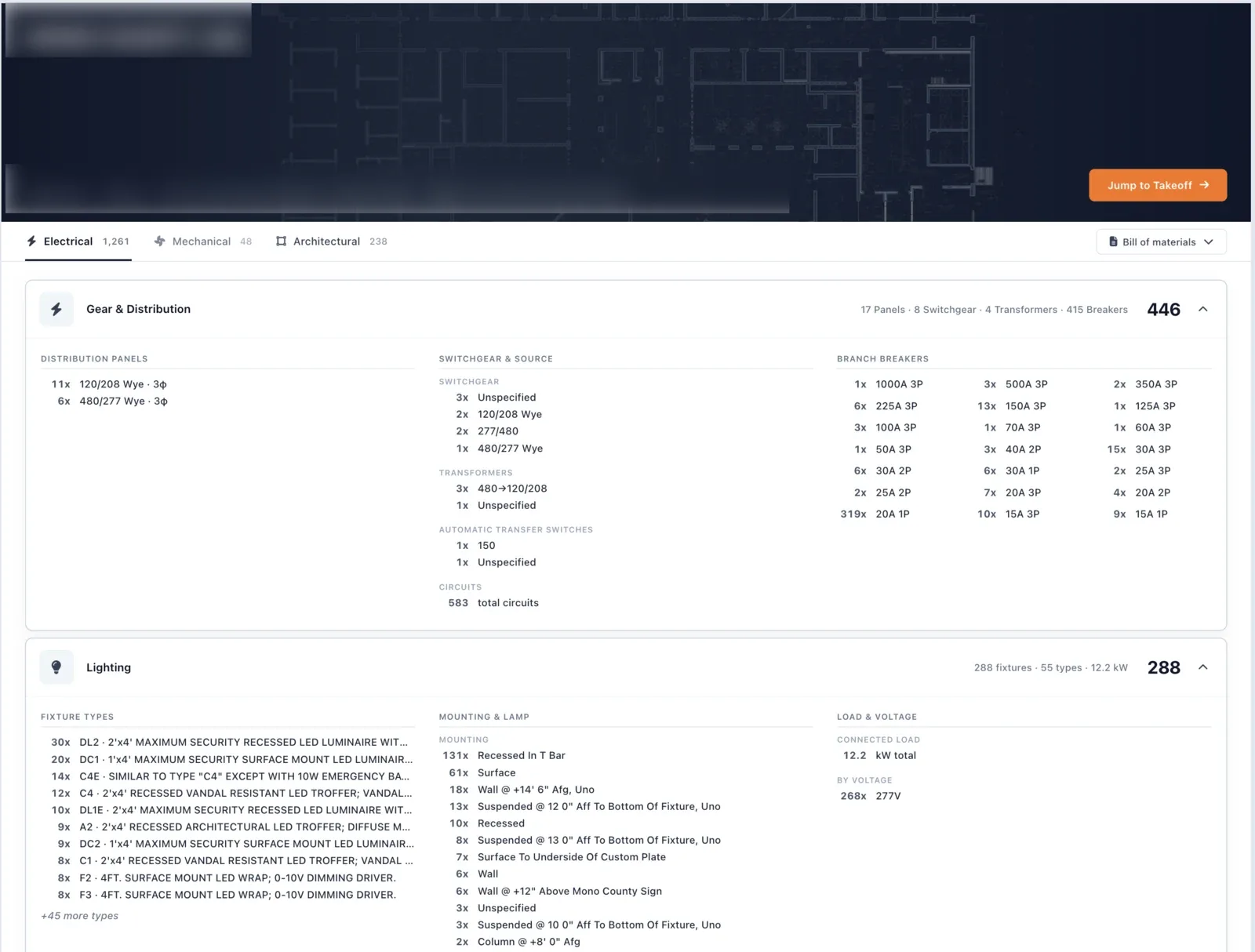 The full takeoff in the BADGER app: the same structured counts the API returns, grouped for review. The 288 lighting fixtures match the lighting-only API run exactly.
The panel schedules come back as structured rows, not pictures. Breaker, poles, phase, load, and circuit description per panel, with one-click CSV export:
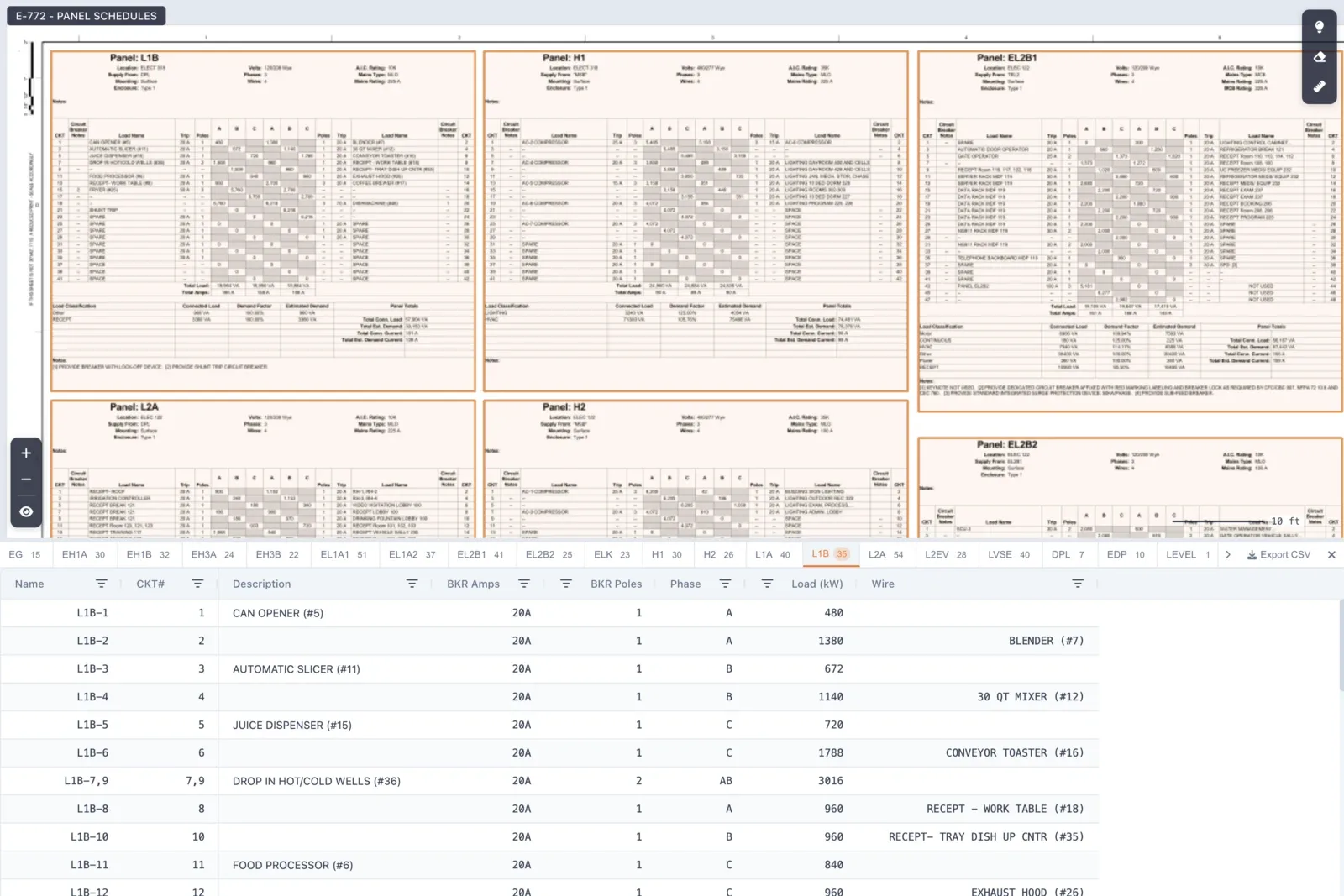 Each panel schedule parsed into a table (panel L1B shown): circuit, breaker amps and poles, phase, and load, the columns you’d otherwise transcribe by hand. This is the reconcile step, done for you.
One PDF in, a fully counted takeoff out:
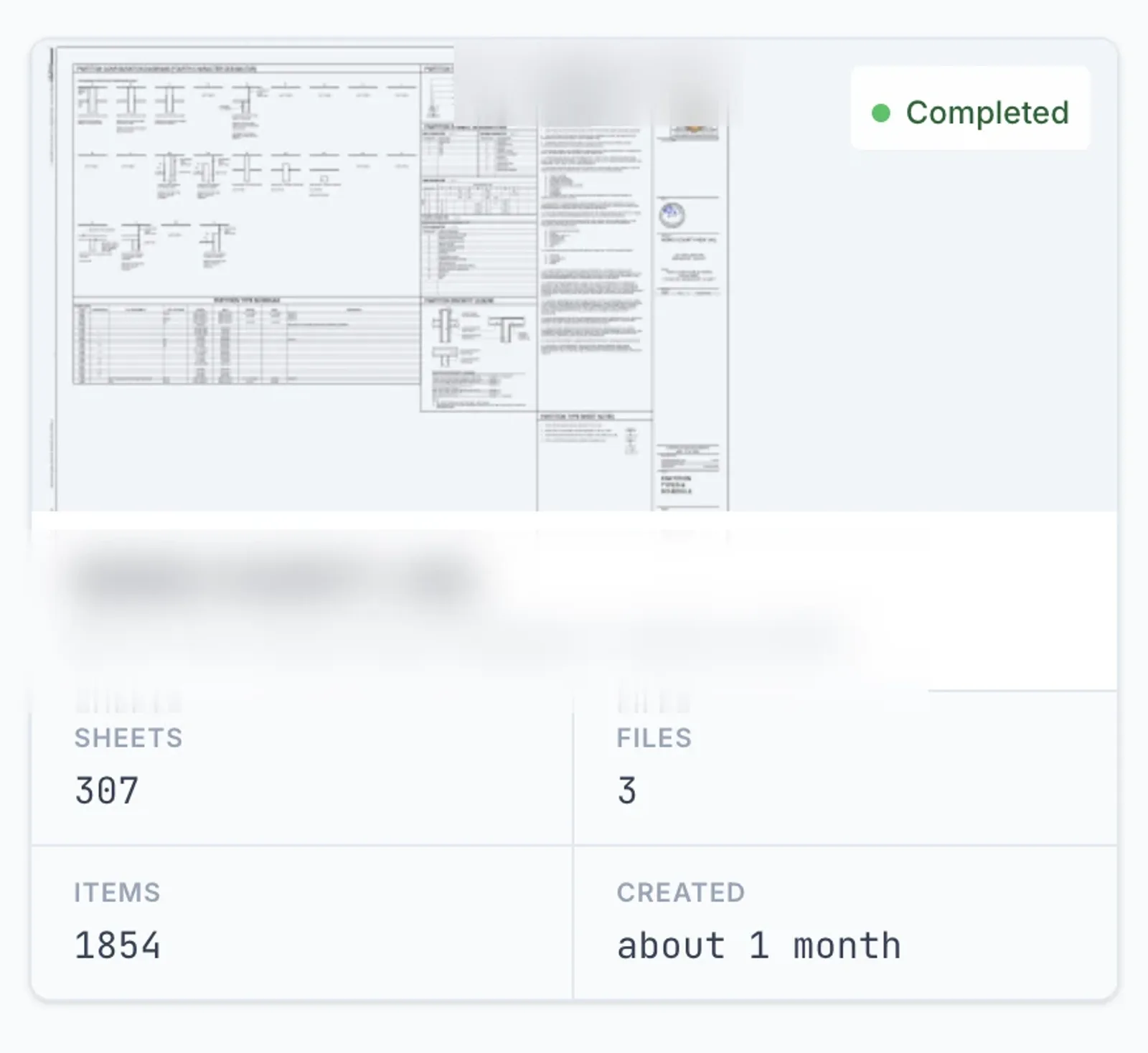 307 sheets and 1,854 items, processed and marked complete: the whole set, not a hand-picked demo page.
Copy-and-paste prompts for takeoffs
Once your key is set, these get Claude to do the API work for you:
List every lighting fixture in my latest BADGER extraction with its manufacturer,
model, and the sheet it appears on. Group identical fixtures and give me a count
per type.
An addendum dropped. Re-run the takeoff on the revised PDF, then compare it to
my previous extraction for this project and show me only what changed, by
category and by sheet.From the extraction's equipment data, draft a scope-gap checklist: what's
commonly on an electrical job that I should confirm is or isn't in scope here
(temp power, fire alarm, low-voltage, site lighting)?Reshape this takeoff into the import format for [my estimating software]:
columns in this order, one row per assembly, quantities only.Common mistakes to avoid
- Leaking your API key. Set it as an environment variable; don’t paste it into shared chats or commit it to a repo. Rotate it in your BADGER account if it’s ever exposed.
- Bidding off the wrong revision. Re-run the extraction whenever an addendum lands; don’t reconcile against a superseded set.
- Trusting the counts without a spot-check. Verify the cluttered and high-cost pages by hand. The AI gives you a head start, not a signature.
- Expecting AI to do the electrical judgment. Conduit routing, feeder sizing, NEC nuance, and labor units are yours. The tool counts; it doesn’t engineer.
- Ignoring scale and routing on measured items. Counts are automated; lengths still need real routing paths, rises, offsets, bends, and a waste factor.
- Only testing on clean demo plans. Run it on a genuinely messy real-world set so you learn where it needs review before bid day.
How accurate and how fast is an AI electrical takeoff?
Fast: a plan set goes from PDF to structured counts in minutes rather than the hours a manual count takes. Accurate enough to be useful, and honest about the rest: AI symbol-counting is commonly reported in the 85–90% range out of the box, and lower on cluttered or scanned sheets. A candid practitioner warns that demo accuracy claims often assume “clean symbols, perfect orientation, no overlap” and that “accuracy drops to around 85%, sometimes less, and that’s under ideal conditions.” Plan for review, and the speed is a real win. (In our live test run above, the public API returned 288 fixtures across five lighting sheets in about 14 minutes.)
What it nails: high-volume device, fixture, panel, and gear counts, and schedule extraction as structured data. What it won’t do: route conduit, size feeders, pick the right assembly and labor unit, or read scope out of the spec language. That division mirrors where the industry already lands: AI does the counting, the estimator does the judgment.
Estimators who’ve adopted AI takeoff describe the upside plainly. One lead estimator told ConstructConnect it’s “really a no-brainer,” doing in twenty minutes what used to take days, while still excluding the most cluttered drawings from the automated pass. That’s the right mental model: let it kill the count, keep your eyes on the hard sheets.
Under the hood: the BADGER REST API
You don’t have to write any of this yourself; Claude does. But here’s the API it’s calling, so you can review what it generates or wire BADGER into your own tools. The base URL is https://app.groundworksystemshq.com; authenticate every request with your key as a Bearer token. The rate limit is 300 requests per 60 seconds per key.
1. Trigger an extraction (POST /v1/extractions, multipart). selected_categories accepts the discipline slugs lighting_plan, power_plan, panel_schedules, telecom, hvac_plan, architectural:
curl -X POST https://app.groundworksystemshq.com/v1/extractions \
  -H "Authorization: Bearer $BADGER_API_KEY" \
  -H "Idempotency-Key: tower-a-level-3" \
  -F "name=Tower A - Level 3" \
  -F "blueprint_files[]=@E-101.pdf" \
  -F "selected_categories[]=lighting_plan" \
  -F "selected_categories[]=power_plan" \
  -F "selected_categories[]=panel_schedules"
You get back 202 with the new extraction’s id and a queued status. Re-sending the same Idempotency-Key returns the original run instead of launching a second one (and doesn’t spend another credit).
2. Poll until it’s done, then pull the counts:
# Poll: status goes queued -> processing -> completed
curl https://app.groundworksystemshq.com/v1/extractions/EXTRACTION_ID \
  -H "Authorization: Bearer $BADGER_API_KEY"

# Read equipment, optionally filtered by category
curl "https://app.groundworksystemshq.com/v1/extractions/EXTRACTION_ID/equipment?category=lighting" \
  -H "Authorization: Bearer $BADGER_API_KEY"
This is the kind of script Claude writes when you ask it to run a takeoff, here in Python:
import os, requests, time

BADGER = "https://app.groundworksystemshq.com"
H = {"Authorization": f"Bearer {os.environ['BADGER_API_KEY']}"}

# Trigger
r = requests.post(
    f"{BADGER}/v1/extractions",
    headers=H,
    data={"name": "Tower A - Level 3",
          "selected_categories[]": ["lighting_plan", "power_plan", "panel_schedules"]},
    files=[("blueprint_files[]", open("E-101.pdf", "rb"))],
)
ext_id = r.json()["data"]["id"]

# Poll
while True:
    status = requests.get(f"{BADGER}/v1/extractions/{ext_id}", headers=H).json()["data"]["status"]
    if status in ("completed", "failed"):
        break
    time.sleep(10)

# Pull counts + schedules
equipment = requests.get(f"{BADGER}/v1/extractions/{ext_id}/equipment", headers=H).json()["data"]
drawings = requests.get(f"{BADGER}/v1/extractions/{ext_id}/drawings", headers=H).json()["data"]
print(len(equipment), "items across", len(drawings), "drawings")
Every equipment row carries its category, manufacturer, model, and the drawing_id it came from, so your results keep full provenance back to the sheet. The complete reference (every endpoint, field, and error) lives at docs.groundworksystemshq.com.
Next steps
- Get your API key at app.groundworksystemshq.com and set it as
BADGER_API_KEY. - Open Claude Code or Claude Cowork, point it at a real plan set, and ask it to run the takeoff. Then try the reconcile-against-schedules prompt; that’s the moment it clicks.
- Skim the API docs if you want to review or extend what Claude builds.
- See what shipped recently in What we shipped this summer, or the full changelog.
The counting was always the part that didn’t need you. Hand it to BADGER, let Claude write the code to run it, and spend your hours on the parts of the bid that actually win the job.
Sources
- Procore: Estimating for Electrical Contractors
- EC&M: Estimating Basics, The Takeoff
- McCormick: Takeoff vs. Estimate vs. Bid
- NECA: Manual of Labor Units (MLU)
- ConstructConnect: An Estimator’s Take on AI Takeoff
- Best Bid Estimating: The truth about AI and electrical estimating
- Aginera: AI MEP Takeoff, questions estimators should ask